
Toyota Grand Highlander (AS10) 2024 Owners Manual / Vehicle specifications / Specifications / Tire information
Toyota Grand Highlander (AS10): Tire information
Typical tire symbols
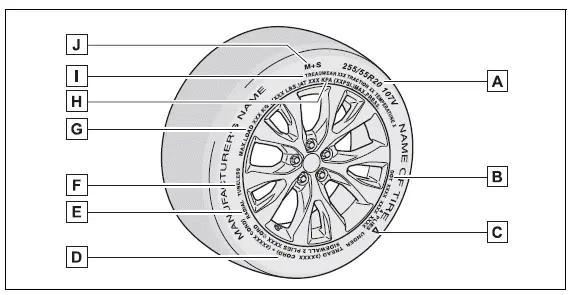
Full-size tire
Compact spare tire
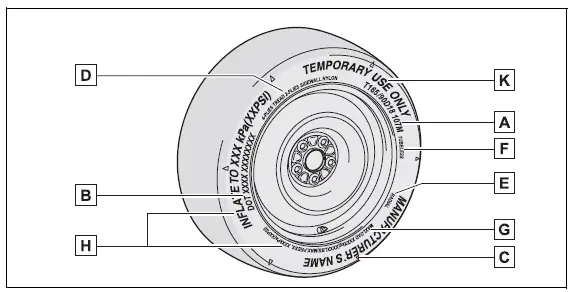
- Tire size
- DOT and Tire Identification Number (TIN)
- Location of treadwear indicators
- Tire ply composition and materials Plies are layers of rubber-coated parallel cords. Cords are the strands which form the plies in a tire.
- Radial tires or bias-ply tires A radial tire has "RADIAL" on the sidewall. A tire not marked "RADIAL" is a bias-ply tire.
- TUBELESS or TUBE TYPE A tubeless tire does not have a tube and air is directly put into the tire. A tube type tire has a tube inside the tire and the tube maintains the air pressure.
- Load limit at maximum cold tire inflation pressure
- Maximum cold tire inflation pressure This means the pressure to which a tire may be inflated.
- Uniform tire quality grading For details, see "Uniform Tire Quality Grading" that follows.
- Summer tires or all season tires An all season tire has "M+S" on the sidewall. A tire not marked "M+S" is a summer tire.
- "TEMPORARY USE ONLY" A compact spare tire is identified by the phrase "TEMPORARY USE ONLY" molded on its sidewall. This tire is designed for temporary emergency use only.
Typical DOT and Tire Identification Number (TIN)
Type A
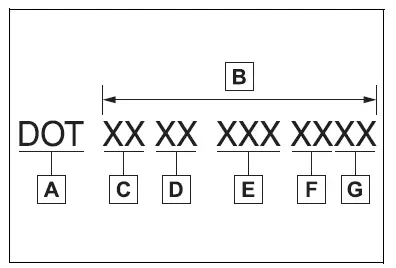
- DOT symbol*
- Tire Identification Number (TIN)
- Tire manufacturer's identification mark
- Tire size code
- Manufacturer's optional tire type code (3 or 4 letters)
- Manufacturing week
- Manufacturing year
*: The DOT symbol certifies that the tire conforms to applicable Federal Motor Vehicle Safety Standards.
Type B
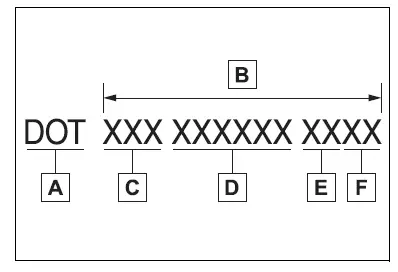
- DOT symbol*
- Tire Identification Number (TIN)
- Tire manufacturer's identification mark
- Manufacturer's code
- Manufacturing week
- Manufacturing year
*: The DOT symbol certifies that the tire conforms to applicable Federal Motor Vehicle Safety Standards.


Similar pages:
Meter display
■ Locations of gauges and meters
The units used on the meters may differ depending on the target region.
Engine coolant temperature gauge
Displays the engine coolant temperature
Outside temperature
Displays the outside temperature within the range of -40ºF (-40ºC) to 141ºF
(60ºC)
Speed ...
Driving position memory
This feature automatically
adjusts the driver's seat,
outside rear view mirrors
and head-up display (if
equipped) to make entering
and exiting the vehicle easier
or to suit your preferences.
Up to 2 different driving
positions can be recorded.
Each electronic key can be
registered to recall your p ...