
Toyota Grand Highlander (AS10) 2024 Owners Manual / When trouble arises / Steps to take in an emergency / If the vehicle becomes stuck
Toyota Grand Highlander (AS10): If the vehicle becomes stuck
Carry out the following procedures if the tires spin or the vehicle becomes stuck in mud, dirt or snow:
Recovering procedure
1. Stop the engine. Set the parking brake and change the shift position to P.
Do not press the shift release button after shifting the shift position to P.
2. Remove the mud, snow or sand from around the front wheels.
3. Place wood, stones or some other material under the front wheels to help provide traction.
4. Restart the engine.
5. Change the shift position to D or R and release the parking brake. Then, while exercising caution, depress the accelerator pedal.
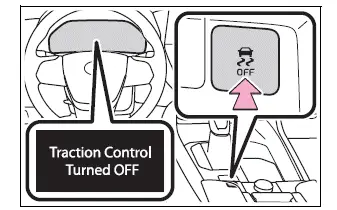
■When it is difficult to free the vehicle
Press  to turn off TRAC.
WARNING
■When attempting to free a stuck vehicle
If you choose to push the vehicle back and forth to free it, make sure the surrounding area is clear to avoid striking other vehicles, objects or people. The vehicle may also lunge forward or lunge back suddenly as it becomes free.
Use extreme caution.
■When changing the shift position
Be careful not to change the shift position with the accelerator pedal depressed.
This may lead to unexpected rapid acceleration of the vehicle that may cause an accident resulting in death or serious injury.
NOTICE
■To avoid damage to the transmission and other components
- Avoid spinning the front wheels and depressing the accelerator pedal more than necessary.
- If the vehicle remains stuck even after these procedures are performed, the vehicle may require towing to be freed.


Similar pages:
Vehicle load limits
Vehicle load limits include
total load capacity, seating
capacity, trailer weight rating
and cargo capacity.
Total load capacity (vehicle
capacity weight)
Total load capacity means the
combined weight of occupants,
cargo and luggage.
Seating capacity
Seating capacity means the maximum
number ...
Digital Rear-view Mirror
The Digital Rear-view Mirror
is a system that uses the
camera on the rear of the
vehicle and displays its
image on the display of the
Digital Rear-view Mirror.
The Digital Rear-view Mirror
can be changed between
optical mirror mode and digital
mirror mode by operating
the lever.
The Digital Rear-v ...